Slice Registration (regrender register)#
Interactively register a histology slice to the Allen CCF in napari by matching landmark point pairs between the atlas and your slice.
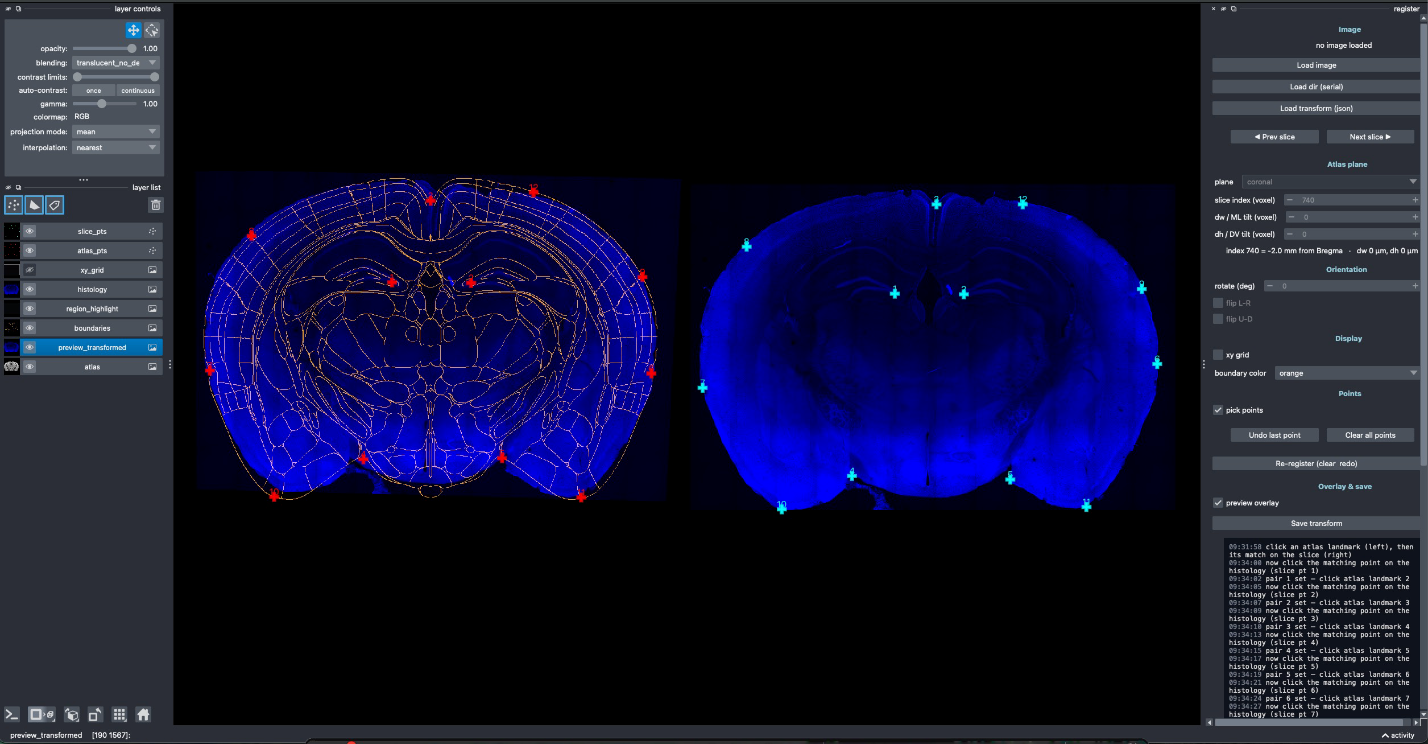
Atlas plane (left) and histology (right) with matched landmark pairs.#
# single image
regrender register -I <image.tif>

# folder of serial sections (step through with Prev/Next)
regrender register -D <slices_dir>
Workflow#
The GUI shows the atlas plane on the left and your histology on the right.
Choose the cutting plane (coronal / sagittal), the slice index (atlas plane), and the
dw/dhtilt offsets to match the atlas plane to your section.Adjust the slice with rotate and flip L-R / U-D as needed.
Pick matched landmark pairs — click a point on the atlas, then the corresponding point on the slice (alternating). A homography (or
--affinetransform) is estimated from them.Toggle Preview to overlay the warped histology under the atlas boundaries, and the xy grid display to show a reference grid over the histology while placing points.
Save to write the registration to
<output-dir>/(default<image-dir>/transformations):<name>_transform.json— matrix + metadata (see Data Directory Structure)<name>_transformed.tif— histology warped into atlas space<name>_overlay.png— warped histology with atlas boundaries burned in, segmented to the brain: everything outside the atlas region is transparent
Use --load <…_transform.json> (with -I) to resume a saved session — it restores the
points, slice index, tilt, rotation, and flips.
Options#
Option |
Meaning |
|---|---|
|
Histology image path (optional; can also load from the GUI). |
|
Folder of serial sections; step through with Prev/Next. |
|
Cutting orientation ( |
|
Atlas resolution in µm (default |
|
Output directory (default |
|
Output name (default: image stem). |
|
Flip the histology before registration. |
|
Use an affine instead of projective (homography) transform. |
|
Resume from a saved |